What is My IP Address? How to Find & Check It Free in 2026
Your IP address reveals more about you than you might think. Here's how to find it — and what it actually means.

My cousin called me last year in a mild panic. She'd been chatting with someone online who suddenly said: "I know you're in Ahmedabad, Gujarat." She hadn't told them that. She hadn't shared her location. She was convinced she'd been hacked.
She hadn't been hacked. Her IP address had given away her approximate location — completely automatically, the way it does for every single internet user, every single time they go online.
I pulled up an IP checker, showed her exactly what information her connection was broadcasting, and watched her expression shift from panic to fascination.
"I had no idea my internet connection was telling websites all of this," she said.
Most people don't. This guide explains what your IP address is, what information it reveals, how to find it instantly for free, and — importantly — what you can actually do with that information.
Quick Answer — What Does an IP Address Checker Show You?
An IP address checker instantly detects and displays your current connection details without you typing anything. A full result includes:
IP Address — your current public IPv4 or IPv6 address
IP Version — whether you're on IPv4 or IPv6
ISP — your Internet Service Provider
Organization — the registered network owner
ASN — your Autonomous System Number
Country, Region, City — your approximate geographic location
Coordinates — latitude and longitude of your connection
Browser — which browser you're using and its version
Operating System — Windows, Mac, Linux, Android, iOS
User Agent — the full technical string your browser sends to every website
All of this is detected automatically the moment you open the page. No typing required.
What is an IP Address?
IP stands for Internet Protocol. Your IP address is a unique numerical label assigned to your device by your Internet Service Provider (ISP) every time you connect to the internet. It works like a postal address — it tells the internet where to send the data you're requesting.
When you open a website, your browser sends a request to that site's server. That request includes your IP address so the server knows where to send the page back to. Without an IP address, two-way communication on the internet would be impossible.
There are two types of IP addresses in use today:
IPv4 — The original format. Four numbers separated by dots, like 203.0.113.47. Only about 4.3 billion unique addresses are possible, and we've essentially run out of them globally.
IPv6 — The modern replacement. A longer hexadecimal format like 2401:4900:8fef:5d4d:71af:334e:8368:d920. Virtually unlimited addresses — enough for every device that will ever exist. More and more ISPs are now assigning IPv6 addresses as the primary connection type.
What Information Does Your IP Address Reveal?
This is where most people get surprised. Your IP address doesn't reveal your name, your exact street address, or your personal details — but it does reveal:
Your ISP — Every IP address is registered to a network operator. Anyone who sees your IP can look up which ISP it belongs to. If you're on Airtel, Jio, BSNL, or any other provider — that's visible.
Your approximate location — IP addresses are mapped to geographic regions through databases maintained by regional internet registries. The accuracy varies: country is almost always correct, city is usually correct to within 20–50 km, but your exact street or neighborhood is not revealed.
Your connection type — Whether you're on a home broadband connection, a mobile network, a corporate network, or a VPN.
Your device and browser — Through a related mechanism called the User Agent string, every browser automatically announces what browser, version, and operating system it's running. Websites use this to serve compatible content.
This is why your cousin's online contact knew she was in Ahmedabad — not from hacking, but from basic IP geolocation data that every website technically has access to.
How to Find Your IP Address for Free — Step by Step
The fastest and most detailed way is using allinonetools.net/my-ip-browser-information/ — a free tool that automatically detects and displays your complete IP and device information the moment you open it.
Step 1: Visit allinonetools.net/my-ip-browser-information/
Step 2: The tool automatically detects everything — no typing, no button to click
Step 3: Your full IP and device information card appears instantly
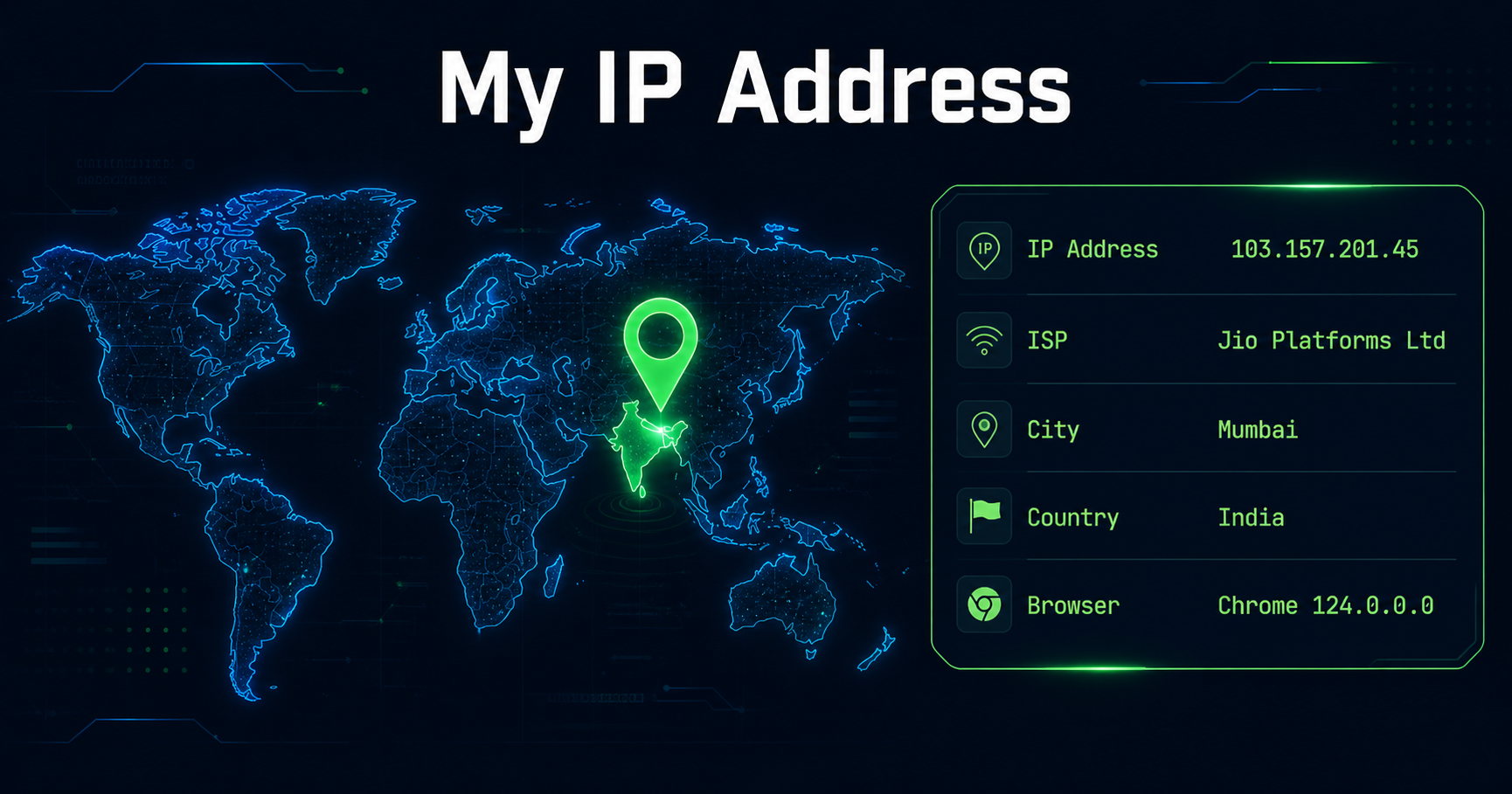
Here's what a typical result looks like:
IP Address       →  203.0.113.47
IP Version       →  IPv4
ISP              →  Reliance Jio Infocomm Limited
Organization     →  Reliance Jio Infocomm Ltd
ASN              →  AS55836 Reliance Jio Infocomm Limited
Country          →  India (IN)
Region           →  Maharashtra
City             →  Mumbai
Coordinates      →  19.0760, 72.8777
Browser          →  Chrome
Browser Version  →  147.0.0.0
Operating System →  Windows
User Agent       →  Mozilla/5.0 (Windows NT 10.0; Win64; x64)...
At the bottom, a "View on Map" button opens your detected location visually on a map — great for verifying the geolocation accuracy of your connection.
No sign-up. No button to click. Open the page, see your data. That's it.
Understanding Every Field in the Result
IP Address — Your current public IP. This is what every website you visit can see. It changes if you restart your router, switch networks, or use a VPN.
IP Version — Whether your ISP assigned you an IPv4 or IPv6 address. An increasing number of modern ISPs now default to IPv6, especially on mobile networks.
ISP — Your Internet Service Provider. Airtel, Jio, BSNL, ACT, Hathway — whoever provides your internet connection. This is publicly registered data tied to your IP range.
Organization — The registered network owner. Usually the same as your ISP, but on corporate or university networks it may show the institution's name instead.
ASN (Autonomous System Number) — A unique identifier for your ISP's network on the global internet. Format: AS followed by a number (e.g., AS24560). Useful for network engineers and security researchers tracing traffic origins.
Country / Region / City — Your approximate location based on IP geolocation databases. Country is highly accurate. City is usually correct but may be off by 20–50 km depending on how your ISP allocates its IP ranges.
Coordinates — The latitude and longitude associated with your IP's registered location. Click "View on Map" to see it plotted visually.
Browser & Browser Version — Detected from your User Agent string. Shows which browser you're currently using and its exact version number.
Operating System — Windows, macOS, Linux, Android, iOS — detected automatically from your browser's User Agent.
User Agent — The full technical string your browser sends to every single website you visit. Contains your browser name, version, rendering engine, and OS details. Websites use this to serve compatible content and developers use it for debugging.
IP Address Checker: Free Tool vs Other Methods
| Method | Details Shown | Ease of Use | Cost |
|---|---|---|---|
| allinonetools.net/my-ip-browser-information/ | IP, ISP, Location, Browser, OS, ASN, User Agent, Map | ✅ Instant, no typing | ✅ Free |
| Google search "what is my IP" | IP address only | ✅ Simple | ✅ Free |
| whatismyip.com | IP + basic location | ✅ Simple | ✅ Free |
| Terminal / Command line | IP only (local) | ❌ Technical | ✅ Free |
| VPN app dashboard | VPN IP + location | ✅ Simple | ❌ Paid (VPN cost) |
The difference is depth. Google and basic checkers show you your IP address. The tool at allinonetools.net shows you your IP address plus ISP, ASN, full geolocation, browser, OS, user agent, and map view — everything in one place, automatically, for free.
Public IP vs Private IP vs Local IP — What's the Difference?
This confuses a lot of people. Here's the plain-English breakdown:
Public IP Address — The address your ISP assigns to your internet connection. This is what websites see. It's the address that the IP checker tool detects and shows you. Every household or mobile connection has one public IP.
Private IP Address — The address your router assigns to each device on your home network. Looks like 192.168.1.x or 10.0.0.x. Only visible within your local network — websites cannot see this. Your phone, laptop, and smart TV each have different private IPs but share the same public IP.
Local / Loopback IP — 127.0.0.1 — a special address that always refers to the device itself. Used for testing and development. Never visible externally.
When people ask "what is my IP address," they almost always mean their public IP — which is exactly what the tool detects.
Static vs Dynamic IP — Which One Do You Have?
Dynamic IP — Changes periodically. Most home internet connections use dynamic IPs. Your ISP assigns a new IP from their pool when you reconnect or restart your router. This is the most common type.
Static IP — Fixed and never changes. Usually available as a paid add-on from ISPs. Used by businesses running servers, VPNs, or services that need a consistent, predictable address.
How to tell which you have: Check your IP today using the tool, then restart your router and check again. If the IP changed — you have a dynamic IP. If it stayed the same — it's likely static (or your ISP's lease time is simply very long).
Why People Actually Check Their IP Address
Privacy awareness — Understanding what information your connection broadcasts is the first step to controlling it. Most people are surprised by how much is visible.
VPN verification — After connecting to a VPN, the IP checker confirms whether the VPN is actually working. Your IP should show the VPN server's location, not your real one. If it still shows your home city — the VPN isn't routing correctly.
Network troubleshooting — IT professionals and developers check IP addresses when diagnosing connectivity issues, configuring firewalls, or verifying network setups.
Accessing geo-restricted content — Understanding which country your IP is registered to explains why certain content or services are available or blocked for you.
Remote work and security — Many corporate systems whitelist specific IP addresses for security. Knowing your current public IP is necessary for requesting access.
Gaming and hosting — Players hosting game servers need their public IP to share with others. Port forwarding setups also require knowing the current public IP.
Common Mistakes and Misconceptions About IP Addresses
"Someone knowing my IP can hack me." Not directly. Your IP alone doesn't give anyone access to your device. Combined with specific vulnerabilities it could theoretically be used in certain attacks — but for the average person, someone knowing your IP is not an immediate threat.
"My IP reveals my exact home address." It doesn't. IP geolocation is approximate — typically accurate to city level, sometimes district level. Your actual street address is not in any public IP database.
"My IP never changes." For most home connections, it changes regularly — often every time you restart your router or after your ISP's lease period expires.
"Private browsing hides my IP." It doesn't. Incognito or private mode only prevents your browser from saving local history. Your IP address is still fully visible to every website you visit.
"My IP is the same on every network." No. Your IP changes every time you switch networks — home WiFi, mobile data, office network, coffee shop WiFi all give you different public IPs.
Pro Tips for Getting the Most Out of IP Information
Always verify your VPN after connecting. Open the IP checker immediately after enabling your VPN. Confirm the IP, ISP, and city all show your VPN server's details — not your real location. If your real location still shows, your VPN has a leak.
Check on mobile data vs WiFi. Your public IP is completely different on mobile data vs your home WiFi. Run the checker on both to understand the difference.
Note your User Agent for web development. The User Agent string shown by the tool is exactly what your browser sends to every website. Developers use this when testing browser compatibility or debugging server-side device detection.
Use coordinates with "View on Map." Click the View on Map button to see exactly where your IP is geographically mapped. The accuracy varies by ISP — some map very close to your actual city, others point to the ISP's data center location.
Combine with DNS Lookup for network research. Your IP tells you about your connection. The DNS Lookup Tool tells you how domains are configured. Together they're the core toolkit for basic network investigation.
Check before and after a server migration. If you manage websites, checking your IP before and after moving to a new server confirms your connection is routing to the correct infrastructure.
Semantic Context — Related Concepts Worth Knowing
Geolocation Databases — Companies like MaxMind and IP2Location maintain massive databases that map IP ranges to geographic locations. These are what every IP checker (including this tool) uses under the hood. Accuracy improves constantly but is never 100% precise at city level.
ISP vs Organization vs ASN — Your ISP is the company you pay for internet. The Organization is the legal entity that owns the IP block — usually the same as the ISP. The ASN is the unique network identifier used in BGP routing — the global system that directs internet traffic between networks.
NAT (Network Address Translation) — The technology that lets multiple devices share one public IP. Your router performs NAT — all devices on your home network appear to the outside world as a single IP, while internally each has its own private address.
IPv6 Transition — Many modern ISPs now assign IPv6 as the primary address. If the tool shows an IPv6 address (the long hexadecimal format), your ISP has moved you to IPv6. Some older services and tools don't fully support IPv6 yet — worth knowing if you encounter connectivity issues.
FAQs — Real Questions About IP Addresses
Can websites see my IP address without me doing anything? Yes. Every HTTP request your browser makes includes your IP address — it's technically required for the response to be sent back to you. There's no way to browse the internet without your IP being visible to the sites you visit, unless you use a VPN or proxy.
Does restarting my router change my IP? Usually yes, for home connections with dynamic IPs. Your ISP assigns a new IP from their pool when your router reconnects. The lease duration varies by ISP — some reassign IPs quickly, others maintain the same IP for weeks.
Is this tool safe to use? Completely. The tool simply reads and displays information your browser is already broadcasting to every website you visit. It doesn't collect, store, or share your data — it just shows you what's already publicly visible about your connection.
Why does the city shown not match my actual city? IP geolocation is approximate. Your ISP may allocate IP ranges from a central location (like their regional data center) rather than mapping them precisely to subscriber cities. The country is almost always correct; city accuracy depends entirely on how your ISP has registered their IP ranges.
What if I'm using a VPN — what will the tool show? It will show your VPN server's IP address, location, and ISP — not your real ones. This is exactly how you verify a VPN is working correctly. If the tool still shows your real location after connecting to a VPN, your traffic is leaking outside the VPN tunnel.
Does the tool work on mobile? Yes. Open it on your phone and it detects your mobile IP, carrier (ISP), location, mobile browser, and OS. Your mobile IP will be completely different from your home WiFi IP.
Explore More Free Web & Network Tools
The IP & Browser Information tool is part of a complete suite of free tools at allinonetools.net/web-tools/. These work naturally alongside each other:
Domain to IP Converter — Find the IP address of any website or domain
DNS Lookup Tool — Check all DNS records for any domain
Hosting Checker — Find who hosts any website
WHOIS Lookup — Get full domain registration details
SSL Checker — Verify SSL certificate validity
Domain Age Checker — Find how old any domain is
Conclusion
Your IP address is broadcasting information about you every single time you go online — your ISP, your approximate city, your country, your browser, your operating system. Most people have no idea. Now you do.
The free IP & Browser Information tool at allinonetools.net shows you everything in one place the moment you open it — no typing, no sign-up, no payment. IP address, ISP, location, ASN, browser details, OS, user agent, and a map view. All of it, instantly.
Open it right now and see exactly what the internet knows about your connection. You might find it more interesting — or more revealing — than you expected.
Were you surprised by what your IP revealed about your location or ISP? Drop it in the comments — especially interesting if you're on a VPN and want to verify it's working.
About the author
- Founder of AllInOneTools.net — building simple, free, no-login web tools that solve everyday problems. I focus on practical tools, SEO, productivity, and shipping useful software in public. Writing from real experience while building and growing AllInOneTools.
Comments
Join the discussionGreat breakdown, especially the ISP vs Organization vs ASN distinction, that trips up a lot of people. For anyone building something with this instead of just checking manually, IPGeolocation.io is worth a look too, it returns IP, ASN, ISP, and location data (plus timezone and currency) in a single API call, so it's handy if you want this info programmatically rather than through a web tool.
Thanks, Furqan! Glad you found the ISP, Organization, and ASN breakdown useful. IPGeolocation.io sounds like a useful option for developers who need this data programmatically.


